How Much Does an AI Chatbot Cost for WordPress?
Key Takeaways
|
Most pricing guides on this topic are written by the companies selling you the chatbot. That does not automatically make them misleading, but it is something worth keeping in mind when you see a comparison table where the author’s own product somehow comes out on top.
I wanted to take a different approach with this post. For starters, I checked every price against the vendor’s own pricing page instead of relying on figures copied from other comparison articles. I also looked beyond the marketing claims and checked what actual users are saying on review platforms like G2, Capterra, and Trustpilot.
Sometimes the reviews match what the pricing page promises. Sometimes they tell a very different story. And honestly, that gap can be more useful when deciding which chatbot is worth your money than the price tag alone.
The Four Ways a WordPress Chatbot Actually Bills You
Two chatbots with the same headline price can work completely differently once you start using them. Here is what you are actually paying for, before we get to specific tools.
- Bring your own API key. Plugins like AI Engine, WPBot, and PurioChat install directly on your WordPress site and connect to an AI provider such as OpenAI, Anthropic, or Google using your own account. You pay the plugin a small license fee, usually yearly or one time, then pay the AI provider directly for the tokens you use. WordPress 7.0, codenamed Armstrong, added native AI infrastructure to WordPress core itself, which is part of why this model has grown. abdulbasitrk.com covered what changed in the WordPress 7.0 Armstrong features guide.
- Hosted subscription. Tools like Tidio charge a flat monthly fee for a set number of conversations or AI replies. Predictable, but the included limit is usually lower than it looks once a site gets real traffic.
- Credit based. Chatbase bills in message credits that get consumed at different rates depending on which AI model answers each question. Predicting a monthly bill takes more math than a flat subscription does.
- Per seat plus per resolution. ChatBot.com, now operating under the Text brand, charges per team member with a small number of AI resolutions included, then sells extra resolutions in packs once you go over. This model scales with team size as much as usage, which matters once more than one or two people manage the chatbot.
Real Pricing for Six WordPress Chatbot Options in 2026
Here is what each option actually costs, checked directly against current vendor pricing pages.
| Tool | Free tier | Cheapest paid tier | Billing model | What adds to your bill |
|---|---|---|---|---|
| AI Engine | Yes, full plugin | Pro, $59/year (single site) | Bring your own API key | AI provider token usage, billed separately |
| WPBot | Yes (Lite version) | Starter $39/year, Pro $99/year for WooCommerce | Bring your own API key | Token usage, plus WooCommerce features gated to Pro |
| PurioChat | Yes | Pro, $69 one time | Bring your own API key | Token usage. Independent review data unavailable, see note below |
| Tidio | Yes, 50 Lyro AI conversations/month | Starter, around $29/month | Hosted subscription | Hitting the conversation cap pushes you to the next tier |
| Chatbase | Yes, 50 credits/month, deleted after 14 days idle | Hobby, $40/month | Credit based | Extra credits, and branding removal at $39 to $199/month |
| ChatBot.com (Text) | No permanent free tier, 14 day trial only | Essential, $19/user/month (annual) | Per seat plus per resolution | 10 resolutions included, extra 50 packs cost $49.50 |
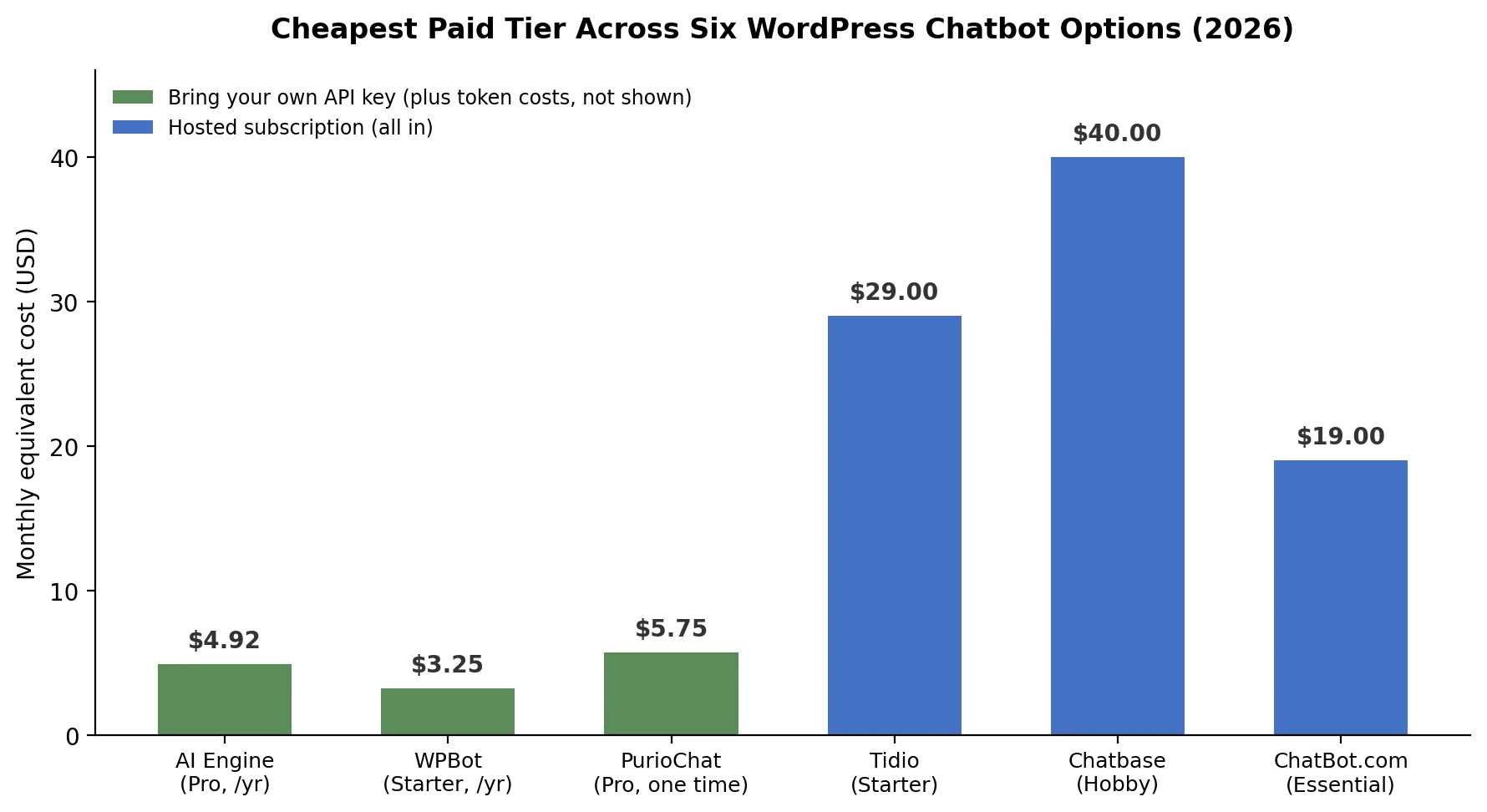
Three things worth flagging before you take a number off this table at face value. ChatBot.com switched its entire pricing structure to per resolution billing during 2026, so an older figure for this tool found elsewhere is probably out of date. Its current pricing is confirmed directly on ChatBot.com’s official pricing page. AI Engine’s Pro price also varies by source, cited anywhere from $59 to roughly $100 a year for a single site license, so check meowapps.com’s own pricing page directly before budgeting. And the PurioChat price above comes from the vendor’s own site. No independent install count or review total could be confirmed for it on WordPress.org, so treat that figure with a bit more caution than the rest of the table.
What the Reviews Say That the Pricing Page Does Not
A price tag tells you what a tool costs. It does not tell you what happens after a few months of actually using it. Review platforms fill that gap, and it is worth checking more than one, since each tends to catch a different kind of complaint.
| Tool | G2 | Capterra | Trustpilot | WordPress.org |
|---|---|---|---|---|
| Tidio | 4.6/5 (1,879 reviews) | 4.7/5 (590 reviews) | 4.0/5 | 4.7/5 |
| Chatbase | Ratings vary by source, see note below | 4.3/5 (73 reviews) | Around 2.0/5 | Not applicable, hosted tool |
| AI Engine | Not listed | Not listed | Not listed | 4.9/5 (859 reviews) |
| WPBot | Not listed | Not listed | Not listed | 4.7/5 (123 reviews) |
| ChatBot.com | Not confirmed at time of writing | 4.6/5 (66 reviews) | Not checked | Not applicable, hosted tool |
| PurioChat | Not found | Not found | Not found | Not independently confirmed |
Tidio: the gap between platforms is the real story
Tidio’s G2 and Capterra scores sit comfortably above 4.5, mostly from people evaluating the tool before buying, confirmed directly on Tidio’s G2 listing and Tidio’s Capterra listing. Trustpilot tells a different story, sitting close to 4.0, confirmed directly on Tidio’s own Trustpilot page, and the reviews there cluster around a specific complaint: the free plan’s conversation limit gets hit faster than expected, and the jump to a paid tier catches people off guard. That is not a reason to avoid Tidio. It is a reason to plan for the paid tier from the start rather than assuming the free plan will hold up.
Chatbase: a wide split, and one number that would not settle
Capterra consistently shows Chatbase at 4.3 out of 5 across 73 reviews, confirmed on Chatbase’s own Capterra listing. On Chatbase’s G2 seller profile, the figure is 4.8 out of 5 from 19 reviews, a small enough sample to read as encouraging rather than settled. Trustpilot is where this gets genuinely contradictory rather than just messy: a direct check of Chatbase’s Trustpilot page shows a 4 star badge from 43 reviews, yet several independent comparison sites separately report a much lower score, closer to 2.0, describing a recurring pattern of billing and cancellation complaints. That is a genuine conflict between what the live page shows and what other sites report, not a rounding difference, and it could not be resolved from research alone. Trustpilot scores also shift as new reviews land, so check the page directly on the date you’re reading this rather than trusting either number here as final.
AI Engine and WPBot: the advantage of a public review trail
Both plugins live on WordPress.org, where reviews are tied to a public install count and cannot be quietly removed the way a vendor testimonial can. AI Engine sits at 100,000 plus active installs with a 4.9 out of 5 average across 859 reviews. WPBot has a smaller but still solid base at 6,000 plus installs and 4.7 out of 5 across 123 reviews. Setup speed and responsive developer support come up repeatedly across both plugins’ review histories, which is a reasonable thing to expect from a WordPress native tool with a smaller, more hands on developer team behind it.
PurioChat: a real gap in independent data
This one deserves a plain flag rather than a workaround. The only review claim available for PurioChat is the vendor’s own statement of customer count and review total across its entire product line, not this plugin specifically. That is not the same as an independent, plugin specific rating, and presenting it as one would be misleading. If PurioChat is a serious option, its actual WordPress.org listing is worth checking directly before making a decision based on reputation.
Hidden Costs That Rarely Make It Onto a Pricing Page
- Branding removal fees. Chatbase charges $39 to $199 a month just to remove “Powered by Chatbase” from the widget, on top of the base plan, per a third party WordPress chatbot comparison that broke down this add on cost. Confirm the current figure on Chatbase’s own pricing page before budgeting, since add on pricing changes more often than base plan pricing.
- Overage charges once a plan’s conversation or resolution limit is hit, which happens faster than most sticker prices suggest.
- AI provider token costs on top of a “free” bring your own key plugin. Usually a few dollars a month for a small site, but it scales with traffic.
- Per seat multiplication on tools like ChatBot.com, where adding a second team member increases part of the bill directly.
The Cost Nobody Puts in a Pricing Table: Keeping It Running
A chatbot plugin is still a plugin. It needs the same ongoing attention as any other part of a WordPress site: core and plugin updates, a compatibility check after a WordPress update, and a periodic look at whether it is slowing the site down. A bloated chat widget can hurt Core Web Vitals the same way an unoptimized image gallery can, and that is a page speed problem before it is a chatbot problem. abdulbasitrk.com’s guide on how to speed up a WordPress website specifically calls out third party scripts, including chat widgets, as one of the more common hidden causes of a slow site.
If keeping a chatbot updated, monitored, and properly integrated is not something you want to manage yourself, that work falls under standard WordPress development and maintenance services, the same category as plugin updates, backups, and uptime monitoring for the rest of the site.
How to Estimate What You Will Actually Pay
- Count your realistic monthly conversation volume, not the hoped for one. Free tiers with a 50 conversation cap run out fast on any site with real traffic.
- Decide whether predictability matters more than a low starting price. A flat hosted plan costs more upfront but will not surprise you later. A bring your own key plugin costs less on paper, but the AI bill moves with usage.
- Add a maintenance line to the budget. Whatever plugin gets chosen, plan for updates and monitoring the same way you would for any other part of the site.
- Recheck pricing before committing. Every tool in this comparison changed its pricing model at least once in the past year, so treat every figure here, including this post’s, as a starting point to verify rather than a final quote.
Free Options Worth Trying First
- AI Engine free tier: full plugin functionality with your own API key. The real cost is whatever the AI provider charges for tokens, often just a few dollars a month for a small site.
- WPBot Lite: a working rule based chatbot at no cost. AI powered replies and WooCommerce features require the paid tiers.
- Tidio’s free plan: 50 Lyro AI conversations a month, which resets monthly rather than being a lifetime cap. Fine for testing, tight for an active site.
Frequently Asked Questions
Is there a truly free AI chatbot for WordPress?
Yes, with real limits. AI Engine and WPBot both offer usable free tiers on WordPress.org, though AI Engine still requires your own API key for AI replies, which carries a small token cost. Tidio’s free plan includes 50 Lyro AI conversations a month at no cost at all.
Why do the same chatbot’s reviews look so different on different review sites?
Each platform tends to attract a different type of reviewer. G2 and Capterra reviews mostly come from people evaluating or recently onboarding a tool. Trustpilot reviews skew toward people who had a specific problem, often billing or cancellation related, strong enough to make them want to leave a review. Both are real, but they are answering slightly different questions.
Do I need to pay extra for WooCommerce support?
Often, yes. WPBot gates WooCommerce features behind its $99 a year Professional tier. Tidio includes WooCommerce order lookup on its paid plans. Check this specifically before assuming a free or entry tier covers store integration.
How much does it cost to run a chatbot on a small WordPress site for a year?
For a bring your own key plugin like AI Engine or WPBot, a realistic small site budget is under $150 a year including the license and token costs. For a hosted tool like Tidio at its entry paid tier, expect roughly $350 a year before any add ons. These are starting points, not guarantees, since actual usage varies by site.
About the Author
Abdul Basit RK, Freelance WordPress Developer
Abdul Basit RK is a freelance WordPress developer with over 7 years of experience building fast, scalable, conversion focused websites. He helps businesses choose and integrate the right tools for their site, including AI chatbots, without the guesswork, and provides ongoing WordPress development and maintenance support.